Short answer
On 15 October 2026 Google announced more links in AI Mode and AI Overviews: inline links shown higher up, related links with thumbnails and wider news carousels, plus tests of an official-sites section and clickable creator names. Google says there's still nothing special to do to appear in its AI answers. Be indexed, be useful, and be clearly the official place to do business with you.
For the last year, most news about Google’s AI answers has been about clicks going missing. On 15 October 2026 Google went the other way and announced more ways to connect with the web from Search: more links in AI Mode and AI Overviews, placed higher, plus two tests that could matter a lot to small businesses.
I’ve gone through Google’s own announcement and its documentation for site owners, and left out the rumours. Here’s what changed, what’s only a test, what it means for your website, and the few things worth doing about it.
What did Google change in AI Mode and AI Overviews?
Five things, in a post by Hema Budaraju, Google’s VP of Product Management for Search, on 15 October 2026. Inline links show higher in answers more often, related links get thumbnails, and news carousels are spreading to more countries. A section for official sites and clickable creator names are both tests.
Here’s each one, and how firm it is. Google didn’t say which devices any of these apply to, and only the news carousels came with any word on location.
Figure
Where an AI answer links out, on an ordinary search
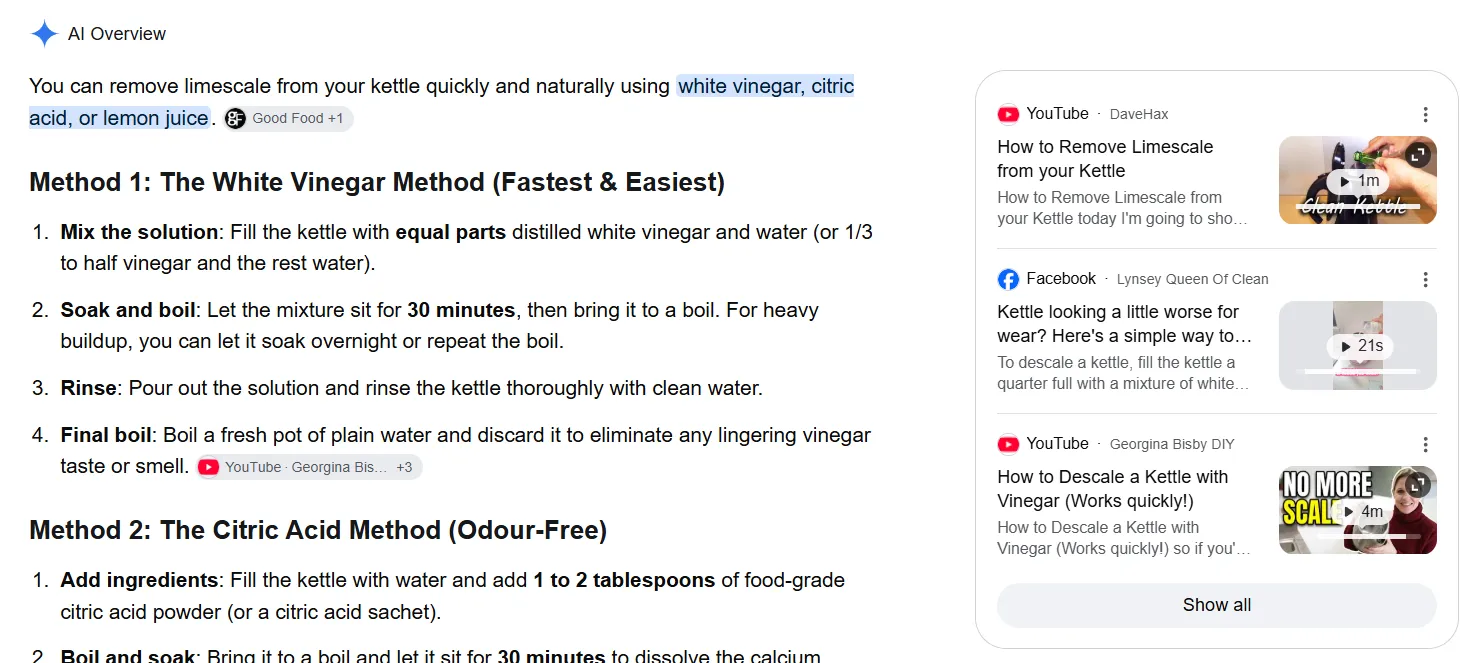 The AI OverviewGoogle’s AI answer, written from pages in its index and sitting above the normal results.Inline linksLinks on words and phrases inside the answer. October’s update shows these higher up more often.Source chipsThe pages a claim came from. A click here is a visit to that site, and the appearance counts in Search Console’s Generative AI report.Links with thumbnailsRelated pages and videos beside the answer. Google gave these image thumbnails and a more clickable design in October.Show allThe rest of the sources, one click away. Most people never open it, which is why the links Google moved higher matter.
Scroll the screenshot sideways to see all of it.
- 1The AI OverviewGoogle’s AI answer, written from pages in its index and sitting above the normal results.
- 2Inline linksLinks on words and phrases inside the answer. October’s update shows these higher up more often.
- 3Source chipsThe pages a claim came from. A click here is a visit to that site, and the appearance counts in Search Console’s Generative AI report.
- 4Links with thumbnailsRelated pages and videos beside the answer. Google gave these image thumbnails and a more clickable design in October.
- 5Show allThe rest of the sources, one click away. Most people never open it, which is why the links Google moved higher matter.
Neither test shows up in that screenshot. Google hasn’t said which searches or countries it’s trying them on, so for now the changes you can actually see are the links.
These features reach a lot of people. When Google announced new controls for site owners in June 2026, it said AI Overviews has more than 2.5 billion monthly users and AI Mode more than 1 billion. AI Mode itself started rolling out in the UK on 28 July 2025.
Will more links mean more traffic from AI Mode?
Possibly, but Google hasn’t published any click numbers to prove it. More links and better placement give your site more chances to be clicked. Whether people click is another matter, and independent research shows people click far less when an AI summary appears.
Google’s position is that AI search isn’t killing clicks. In August 2025, Head of Search Liz Reid wrote that total organic click volume to websites had been “relatively stable” year on year, with slightly more “quality clicks”, meaning visits where people don’t bounce straight back. Google’s guidance for site owners also says clicks from results pages with AI Overviews are higher quality, with people spending more time on the site. Neither comes with data you can check.
Outside research paints a harsher picture. Pew Research tracked the browsing of 900 US adults and found this:
Pew Research Center, browsing data from 900 US adults, March 2025, published July 2025. This predates the October 2026 changes.
That 1% is what Google’s October changes are aimed at. Links buried at the bottom of an answer barely get clicked. Links inside the first few lines, or in a section labelled “official”, are much harder to scroll past.
What is Google’s official-sites section in AI Mode?
It’s a test of a section at the top of some AI answers that shows the one or two official places on the web to complete a specific task, with a note on why each link is useful. Google hasn’t said which searches it applies to, which countries it’s being tested in, or how it decides a site is official.
Google’s wording is that “sometimes, there are only one or two official places on the web to complete a specific task”. Think renewing a passport, paying a council bill, or booking with a particular business. Rather than burying that link in a summary, the test puts it first.
What Google hasn’t done is publish any rules for it. So be wary of anyone selling “official site optimisation” this month. Nobody outside Google knows the signals.
What you can do is make it obvious that your website is the official home of your business. None of this is confirmed as part of the test, but it’s all standard Google guidance that helps your site in normal search anyway:
- Tell Google your site name. Google’s site names guide explains how it chooses the name shown in results, and how to suggest yours with markup.
- Add Organization markup to your home page. Google’s Organization structured data guide covers your name, logo, contact details and other profiles.
- Keep your business details consistent. Google’s guide to establishing your business details points to Business Profile for local businesses and Merchant Center for shops.
- Have a page for each task. If people book, order or request a quote with you, give each action a clear page that does just that, rather than a contact form buried at the bottom of the home page.
What are Google Preferred Sources?
Preferred Sources lets people choose the websites they want to see more of in Google. Content from those sites is more likely to appear in Top Stories with a “preferred” badge, and can carry the same badge in AI Overviews and AI Mode. Google says use has grown more than 7x since the start of 2026.
Google’s Preferred Sources guide for site owners explains how it works. A person adds your domain through Google’s source preferences tool. Google expanded it worldwide for English-language users in December 2025, so UK searchers can already use it.
You can help people add you in three ways:
- A button on your site, which takes two lines of JavaScript (Google’s recommended option).
- A custom version of that button built to match your design.
- A plain link,
google.com/preferences/source?q=yourdomain.co.uk, which works in emails, newsletters and social posts.
There are a couple of catches. People can only add a whole domain or subdomain, not a section such as /blog. And to get the preferred badge in AI Overviews and AI Mode, your site has to be included in Search generative AI features in Search Console. Opt out, and you lose it.
Can UK businesses use Google Search profiles?
Not yet. Search profiles, which the new creator-name test links to, are only available in Canada, India and the US. To claim one you also need at least 10,000 followers or subscribers on YouTube, Instagram, X or TikTok.
A Search profile pulls a creator’s or publisher’s content from across the web and social platforms onto one Google page. In September 2026 Google added a guide to the Search profile badge for creators to put on their own sites. Its eligibility rules make the profiles a creator feature, not a business one, for now.
So if you’ve seen “claim your Google Search profile” advice aimed at UK businesses, it doesn’t apply yet. I’d keep an eye on it if you make video, because that’s where Google is testing the clickable names.
How do you do SEO for Google AI Mode?
The same way you do SEO for Google. Its guidance says there are no extra requirements and no special schema to appear in AI Overviews or AI Mode. A page has to be indexed and eligible to show with a snippet, then be the best answer to the question.
That’s on Google’s page on AI features and your website, which also says you don’t need to create new machine-readable files or AI text files. The preview controls that can block you by accident are listed on its control what you share page. I’ve covered how AI answers choose their sources, and which “AI SEO” tricks to ignore, in the guide to AI SEO. For the October changes specifically, this is the order I’d work in:
What to check on your website after Google's October changes
Make sure your key pages are indexed
If a page isn’t in Google’s index, it can’t be linked from an AI answer, however good it is. Check your service, booking and product pages first.
Search Console’s Pages report shows which pages are indexed and why others aren’t.
Don’t block snippets by accident
A nosnippet tag, or a very low max-snippet setting, stops Google showing your text. That also keeps you out of AI answers. They’re sometimes switched on by plugins or left over from a site build.
Google lists every preview control on its “control what you share” page in Search Central.
Check your Search generative AI setting
In Search Console, go to Settings, then Search generative AI. It should say Include unless you’ve deliberately chosen otherwise.
Make your site clearly the official one
Site name, Organization markup, consistent business details, and a clear page for each thing customers come to do. It’s the best preparation for the official-sites test, and it helps in normal results too.
Answer the question near the top
Inline links attach to words and phrases in the answer. Pages that state a clear answer, with real detail behind it, give Google something specific to link to.
Watch the Generative AI report
Check it monthly alongside your normal Performance report, so you can see whether these changes are showing your pages more often.
Should you opt out of AI Overviews and AI Mode?
For most small businesses, no. Search Console’s Search generative AI setting lets you exclude your site, and Google says it doesn’t affect your normal rankings. But your links and content stop appearing in AI Overviews, AI Mode and Discover’s AI features, and you get no traffic or impressions from them.
The setting came out of Google’s talks with the UK’s competition regulator, the CMA. Google started testing it with a group of UK site owners in June 2026 and rolled it out to every website worldwide on 31 August. The Search Console help page explains the three options: Include (the default), Exclude, and Inherit for properties that sit under another one. If you choose Exclude, your content drops out within a day or two.
How do you track AI Mode traffic?
Clicks from AI Overviews and AI Mode are counted in Search Console’s Performance report under the Web search type, mixed in with everything else. The Generative AI performance report shows how often your pages appeared in those features, by page, country, device and date, but only impressions, not clicks.
The Generative AI report reached every site in August 2026. It may not appear if your site has very few AI impressions or you’ve opted out. I’ve walked through it, with a screenshot of my own site’s report, in the Google Search Console guide.
What it can’t tell you yet is whether October’s extra links turned into visits. For that, compare the Generative AI report with clicks on the same pages in the Performance report, month on month. If impressions in AI answers are climbing and clicks on those pages are holding steady or rising, the changes are working for you.
If you’d rather someone checked all of that for you every month, and kept an eye on what Google tests next, that’s part of my website management plans.
Common questions
What did Google announce on 15 October 2026?
More ways to reach websites from its AI answers. Inline links now show higher in AI Mode and AI Overviews responses more often, links at the end of some answers get image thumbnails, and news carousels that highlight Preferred Sources are rolling out to more countries and languages. Google is also testing a section for one or two official sites on task-based searches, and clickable creator names on AI Mode video results.
Do I need special schema or an llms.txt file for AI Mode?
No. Google's guidance says there are no extra requirements and no special schema.org markup needed to appear in AI Overviews or AI Mode. A page needs to be indexed and eligible to show in Search with a snippet. Structured data still helps Google understand a page, as long as it matches what's visible on it.
Can I stop my website appearing in AI Overviews and AI Mode?
Yes. Search Console has a Search generative AI setting, rolled out to every site in August 2026. Set it to Exclude and your links and content stop appearing in AI Overviews, AI Mode and Discover's AI features within a day or two. Google says it doesn't affect your normal rankings, but you also lose any traffic and impressions from those features.
How do I see AI Mode traffic in Search Console?
Clicks from AI Overviews and AI Mode are counted in the Performance report under the Web search type, mixed in with everything else. The Generative AI performance report shows how often your pages appeared in those AI features, by page, country, device and date, but it shows impressions only.
Is AI Mode available in the UK?
Yes. Google started rolling AI Mode out in the UK on 28 July 2025. It's a tab on the search results page and in the Google app. Search profiles, which the new creator-name test links to, aren't available in the UK yet.
Should a small business add the Preferred Sources button?
Only if you publish things people would want to follow, like regular news, guides or updates. Preferred Sources mostly affects Top Stories and news carousels. It's free and takes a couple of lines of code, so a business with an active blog loses nothing by adding a link in its newsletter or footer.
Want to hand your site over to a professional?
Everything above is yours to run with. If you'd rather someone else ran it, send me the address and I'll tell you what I'd fix first — free, and in plain English.
Get a free SEO audit